Parent Portal The Parent Portal can be used to:
- Share student-approved information with parents, guardians, spouses, or others as designated. Access granted may include academic records, class schedules, student accounts, financial aid awards, and residence information.
- Track and manage student information for parents based on FERPA permissions
- Manage and view parental permissions online
- Share information with parents, guardians, or third parties on a timely basis
- Enable parents to view information about a single student or multiple students
Parent Portal permissions are available only at the discretion of the student. The student, not campus personnel, is the only person able to grant permission to view any portion of the student’s data.
What You Need to Know
FERPA Rights
Directory Information
Instructions:
Students should login to their JICS/Student Information account, click on Parent Access tab. Click on Define New Permissions. Fill in information for parent, guardian or other. You may edit your entries through the “Table of Contents” before submitting.
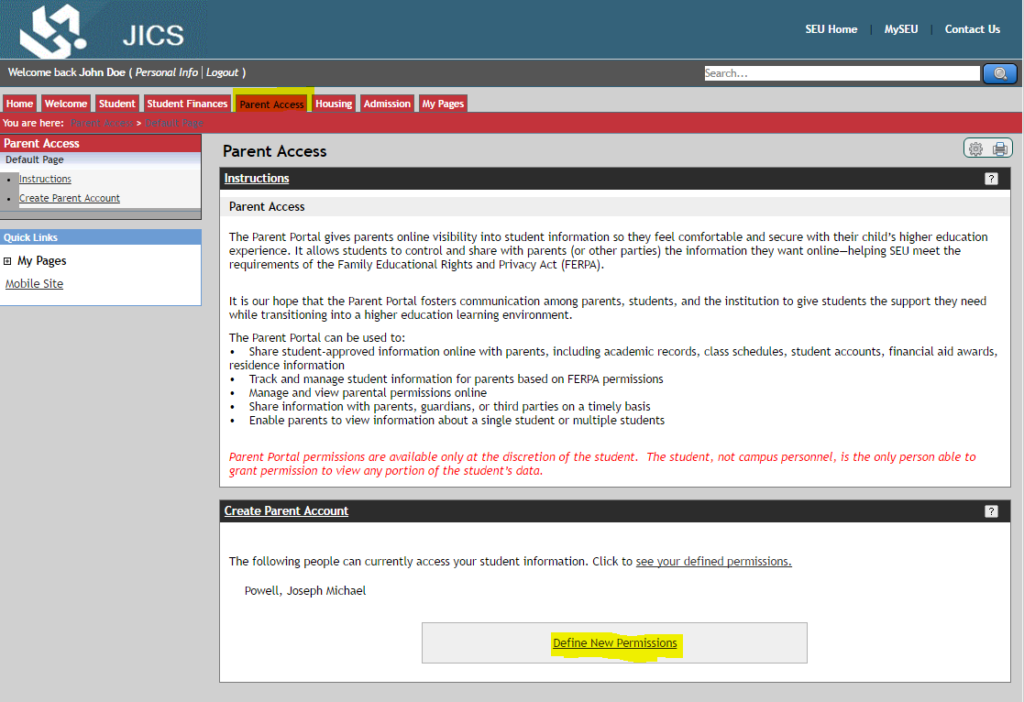
Once submitted, you will receive a message that your entry is waiting to be processed. Within a few days you will receive an email with instructions for your parent or other, to set up their own account for access. Show them how to set up their own account and password.
Students must create a new account for each parent or other relationship that they wish to give access, through the Define New Permissions link. Changes to the permissions may be changed at any time by the student.
If you do not submit the Parent Portal form, SEU will not be able to:
- Talk with you or authenticated person(s) regarding your educational records, including billing information, course schedule, grades, student life information, and housing information over the phone
- Email student information, including billing information, course schedule, grades, student life information, and housing information to authenticated persons
If you do not wish to allow any person to contact the university to obtain educational records, please contact the Office of the Registrar to learn about our Non-Disclosure option. SEU will not be able to release any educational records over the phone, even to the student, if a Non-Disclosure is submitted. Educational records will only be released to the student through the Student Dashboard or SEU Webmail, which require login access.
Back to Traditional Student orientation page
|
 Hours/Location Academic Advising
Location: First Floor Addison Hall
Hours: 8 a.m.-4:30 p.m.
Phone: 863.667.5082
Email: advising@seu.edu
Financial Aid
Location: Addison Hall (2nd floor)
Email: sfs@seu.edu
Registrar
Location: First Floor Addison Hall
Hours: 8:30 a.m.-4:30 p.m.
Phone: 863.667.5015
Email: registrar@seu.edu
|

